Sheets To Labels

Maak elke etikettenbatch sneller op je Mac

Stop met namen, prijzen, adressen en codes één voor één kopiëren. Ontwerp één etiket, koppel je spreadsheet, controleer de batch en exporteer een nette PDF.

Probeer gratis. Koop wanneer de workflow je tijd bespaart.

What you can make

Turn a messy list into labels you can print

The goal is not another design tool. It is getting from spreadsheet rows to finished labels with less copying, checking, and rework.

Turn a messy list into labels you can print

The goal is not another design tool. It is getting from spreadsheet rows to finished labels with less copying, checking, and rework.

Product and inventory labels

Keep names, prices, SKUs, and codes in the sheet; each row becomes a consistent label.

Mailing lists

Turn names and addresses into clean label sheets without fighting a word processor.

Shipping and small batches

Prepare labels for parcels, shelves, bins, and any job where each row needs its own output.

How it works

A calmer way to finish a label batch

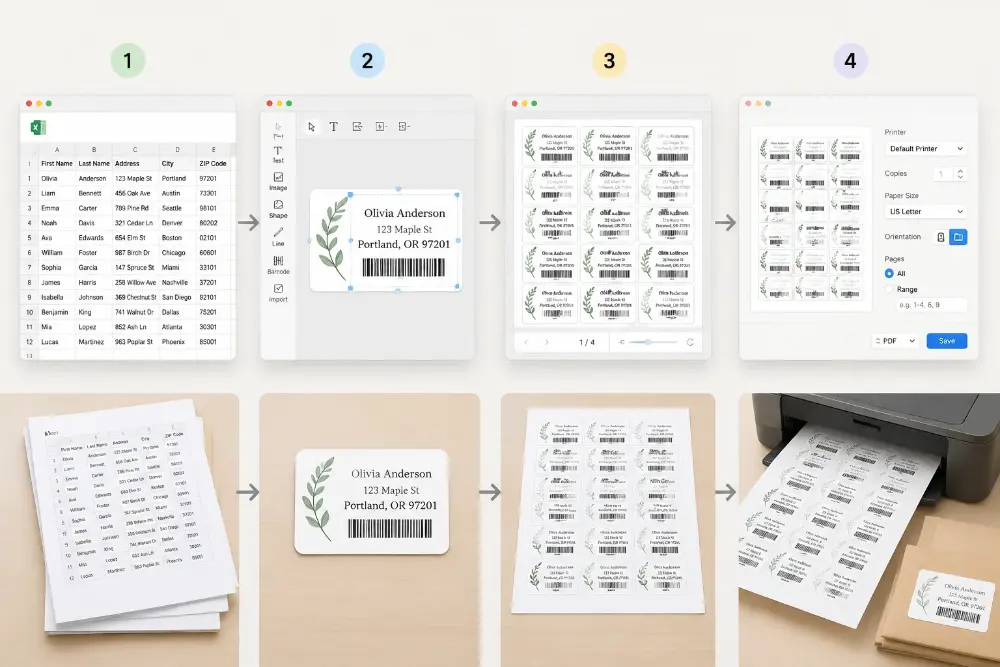
Open the list, check the design, preview the batch, export the PDF.

1
Open your list

Open your list

Start with the file your team already has.

2
Build one label

Build one label

Place fixed text and dynamic fields, then save the layout.

3
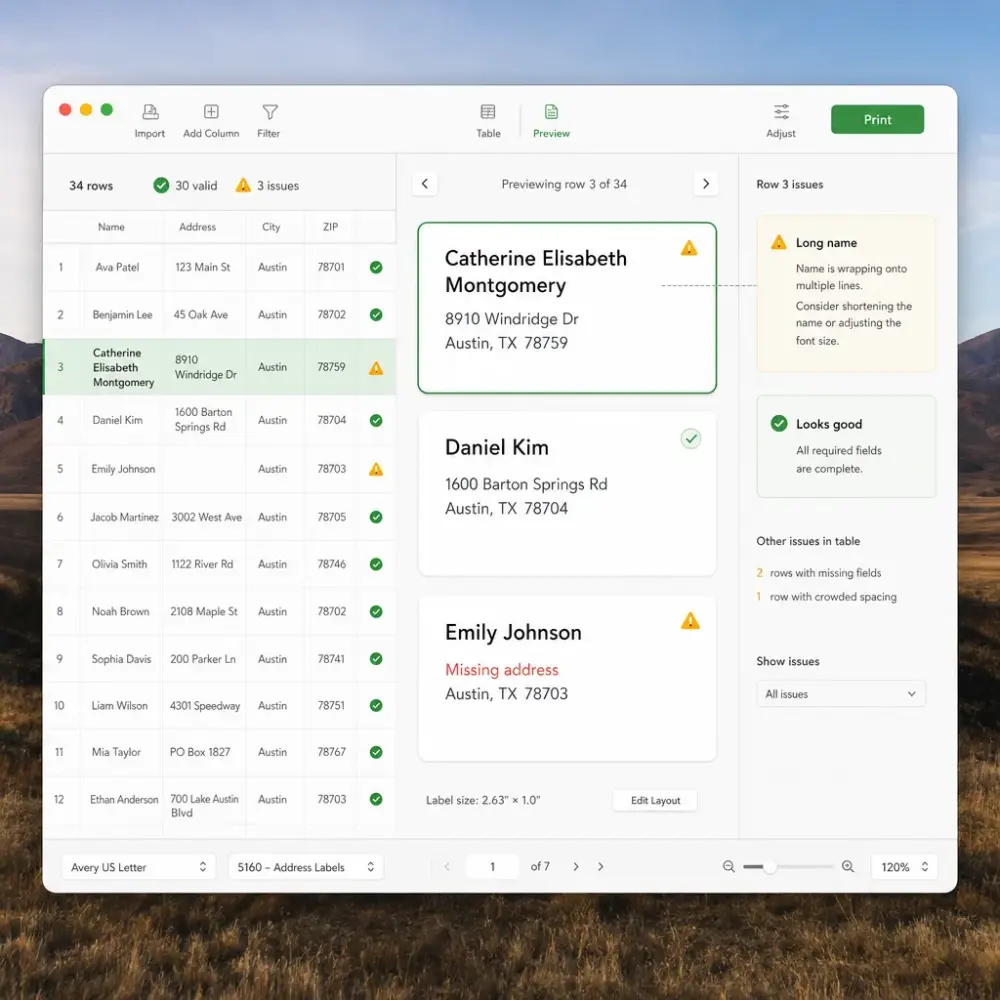
Check real rows

Check real rows

Catch long names, missing fields, and tight spacing before printing.

4
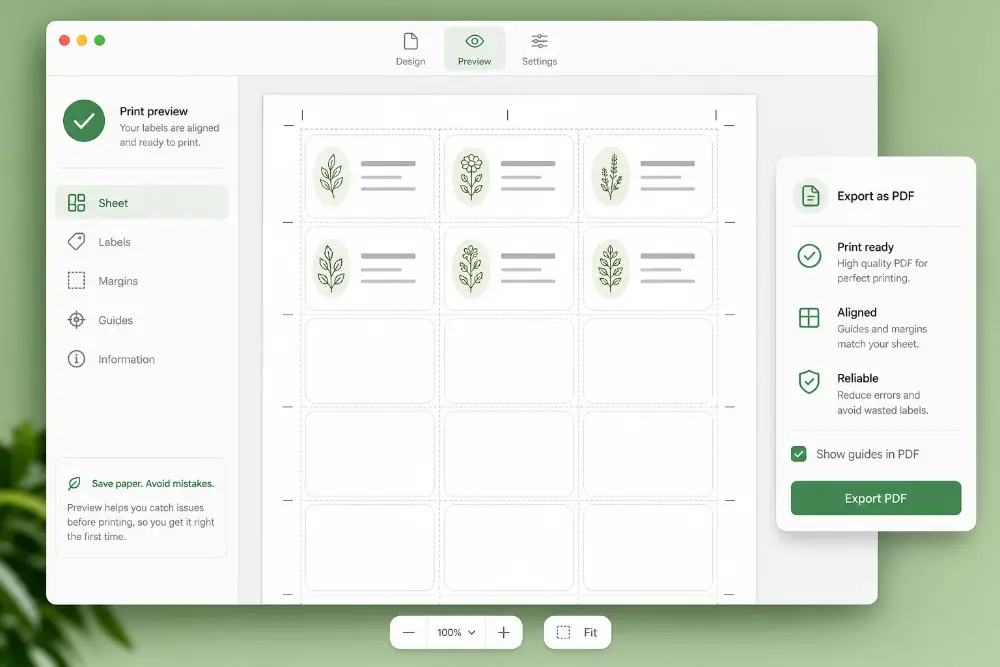
Export and print

Export and print

Create a PDF and print with your normal Mac settings.

Design once, let the data repeat the work

Place text, images, codes, and fields; each new row updates the label automatically.

Use fields instead of typing

Connect parts of the design to spreadsheet columns so each row fills itself.

Control the layout visually

Move and resize the pieces until the label looks right before making the batch.

Save the design for next time

Keep a finished layout and reuse it when a new list arrives.

Export locally after activation

Create clean PDFs from the app once the license is active.

Koop zodra de app tijd bespaart

Test the app with your own files first. Upgrade when you are ready to export clean PDFs without the trial watermark.

Launch price

Label Maker for Mac

$99
For one Mac used by one person or workstation.
Best for one regular label-printing workstation.

Includes

  • Design one label and fill the whole batch from a spreadsheet
  • Export clean PDFs without the trial watermark
  • Keep working files on your Mac
  • Reuse saved designs for repeat jobs
  • Activate on 1 Mac
  • Free updates for the current major version
Multi-Mac

Label Maker for Mac Business

$199
For teams that share label work across a few Macs.
Best for small teams and shared workstations.

Everything in Mac App, plus

  • Activate on up to 5 Macs
  • Give each workstation the same clean export flow
  • Reuse the same designs across repeat batches
  • Export clean PDFs on every activated Mac
  • Priority support

Mac App vs Web Version

Use the Mac app when label printing is a regular job and you want local files, saved designs, and predictable export costs.

Comparison criteria
Mac App
One-time desktop license
Web Version
Web account plan
Price model
$99 one-time for 1 Mac, or $199 one-time for up to 5 Macs
Pay as you go or use a monthly/yearly plan
Exportkosten na aankoop
After activation, export clean PDFs locally without paying for each export.
Clean exports use your web plan or account balance.
Best for
Repeat label jobs, local files, saved designs, shops, offices, warehouses, and back-office workstations
Quick browser jobs, occasional exports, and work you prefer to do online
Local-first workflow
Spreadsheets, designs, and exported files stay on your Mac
Runs in the browser and uses your web account
Output
Nette PDF’s klaar om af te drukken vanuit macOS
Nette PDF’s klaar om af te drukken vanuit browser
Activation
Use checkout email and license key in the Mac app
Sign in and use credits or subscription access

For repeat label jobs, the Mac app usually pays for itself by avoiding repeated setup work and per-export costs.

Gemaakt voor de vervelende delen van etikettenwerk

De vertraging zit vaak in data opschonen, tekst passend maken, layout controleren en dezelfde batches herhalen.

🔒 Keep files on your Mac

Open local spreadsheets and save designs on your own machine. You do not need to upload a working file just to prepare a label batch.

✅ Bouw dezelfde layout niet opnieuw

Maak het etiket één keer, sla het op en gebruik het bij de volgende lijst opnieuw.

📄 Preview before wasting paper

Check the finished batch before printing so long names, addresses, prices, and codes do not surprise you on the page.

🏷️ Handle different label jobs

Use the same workspace for mailing lists, product stickers, shelf tags, warehouse labels, badges, and small office batches.

🧾 Work from the data you already have

Start from the spreadsheet your team already maintains instead of copying each value into a document by hand.

🖨️ Print through your normal setup

Export a PDF, open it on macOS, and print with the printer settings your team already understands.

🛡️ Signed for macOS

The Mac app is signed and notarized so installation feels familiar and safe.

⚡ Focused desktop flow

Use a dedicated app for repeat label work instead of hunting for the right browser tab every time.

💰 Try before paying

Download the app, test a real batch, then upgrade only when the workflow is worth keeping.

Mac App FAQ

Practical answers for teams deciding whether the desktop app fits their label routine.


Heb je nog vragen?

Als je het antwoord dat je zocht niet hebt kunnen vinden, stel ons gerust je vraag!

Labelmaker voor Mac

Install the app, try a real spreadsheet, preview the result, and upgrade when it saves time.

Labelmaker voor Mac - sneller etiketten uit je spreadsheet