Small shops and handmade sellers
Make price tags, sale labels, shelf labels, bakery stickers, candle labels, jewelry tags, product sample labels, and QR product link labels from one spreadsheet.
Design price tags, barcode labels, QR labels, file labels, school asset tags, warehouse stickers, and custom product labels from Excel or CSV. Drag freely, map spreadsheet fields with text templates, choose A4, US Letter, thermal rolls, or custom paper, then export a print-ready PDF on your Mac.
Current download is for Apple Silicon Macs (M1/M2/M3/M4). Try your real spreadsheet first; trial exports include a watermark until you activate a license.

What you can make
Use one desktop workflow for the labels that keep coming back: product prices, SKU stickers, QR tags, classroom assets, file folders, warehouse bins, shelf labels, and small custom paper jobs.
Make price tags, sale labels, shelf labels, bakery stickers, candle labels, jewelry tags, product sample labels, and QR product link labels from one spreadsheet.
Keep SKUs, product IDs, bin locations, asset IDs, and internal codes in your file. Turn each row into a consistent barcode or QR label.
Create student item labels, classroom asset tags, file folder labels, archive box labels, equipment tags, and name badges without rebuilding the layout.
Prepare labels for A4, US Letter, thermal rolls, Avery-style sheets, custom tag sheets, and compact labels where each row needs its own output.
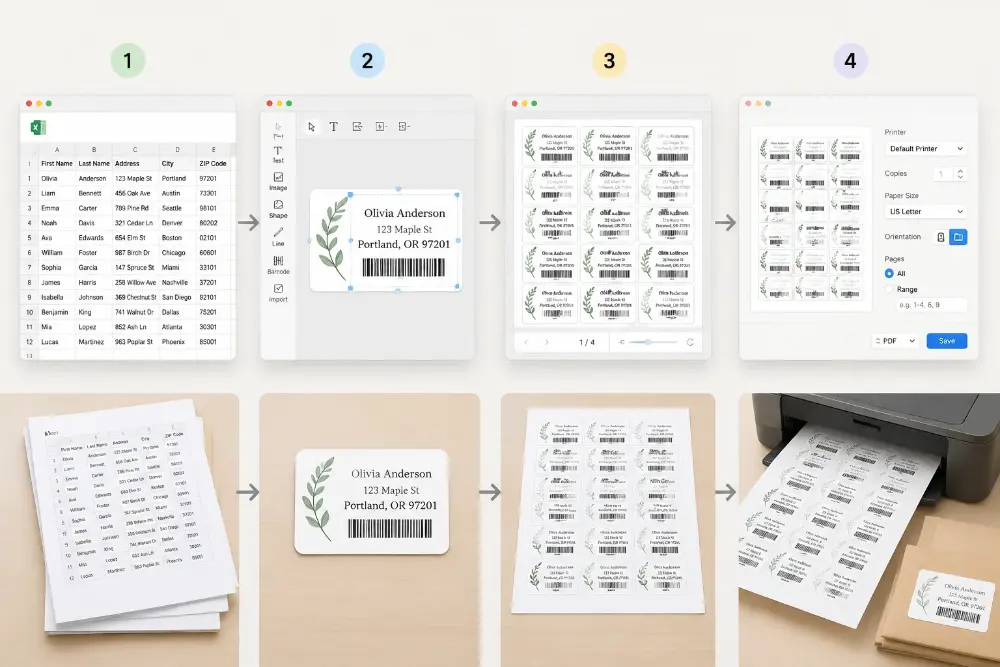
Keep the workflow repeatable: design one label, map the data, choose the paper and tag size, preview the real batch, then export the PDF.

Drag text, prices, logos, shapes, barcodes, QR codes, and fixed elements into the exact layout your tag needs.

Use columns for product names, prices, SKUs, sizes, dates, classroom names, file numbers, bin locations, asset IDs, and QR links.

Set A4, US Letter, thermal roll, Avery-style sheet, or custom paper dimensions. Enter the tag size and let the app calculate rows and columns.

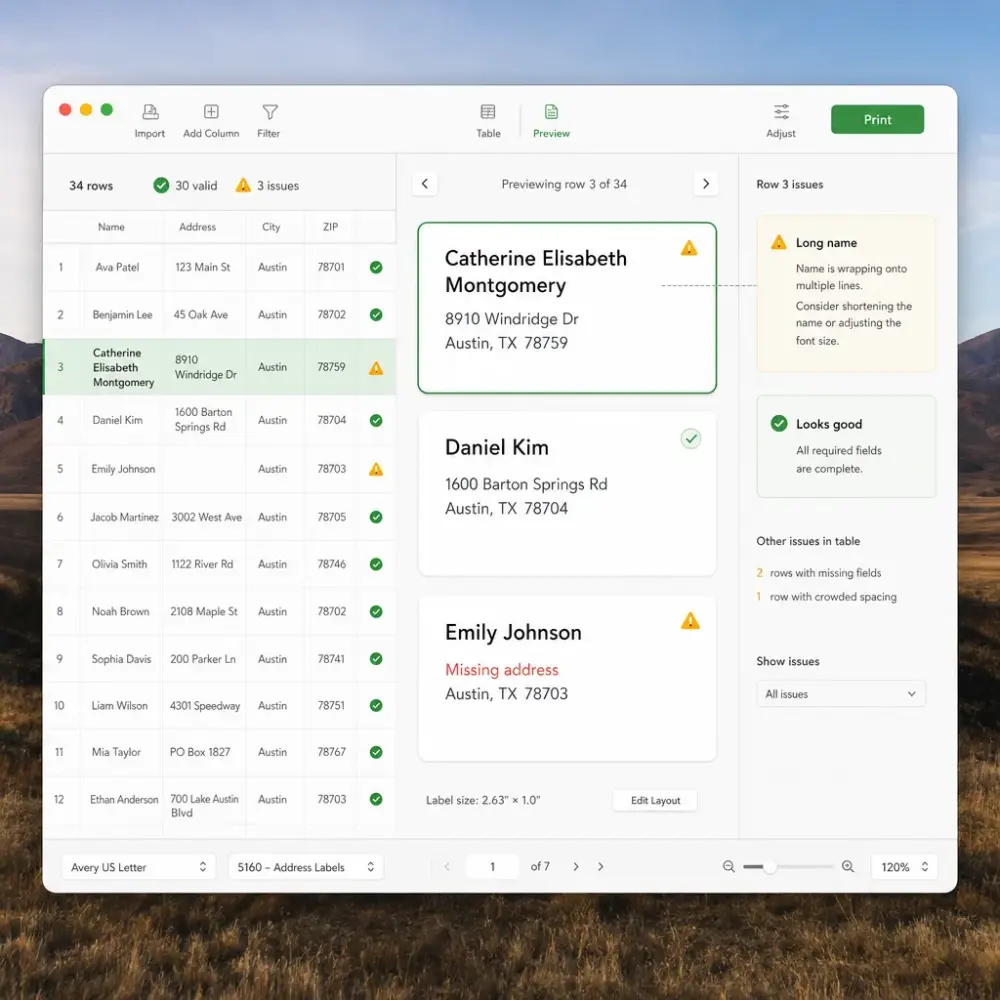
Check real rows for crowded text, missing values, bad codes, and spacing problems. Export a PDF and print through your normal macOS printer settings.
Place text, prices, images, shapes, barcodes, QR codes, and data fields exactly where they belong. Use text templates to combine columns, then let each spreadsheet row fill the next label automatically.
Build blocks like {{Product Name}} - {{Price}}, SKU: {{SKU}}, or Room: {{Classroom}} from your spreadsheet columns.
Move and resize prices, product names, logos, QR codes, barcodes, images, and shapes until the tag looks right.
Keep finished layouts for weekly price updates, new inventory files, classroom lists, file archives, or shop batches.
Create clean print-ready PDFs from the Mac app once the license is active.
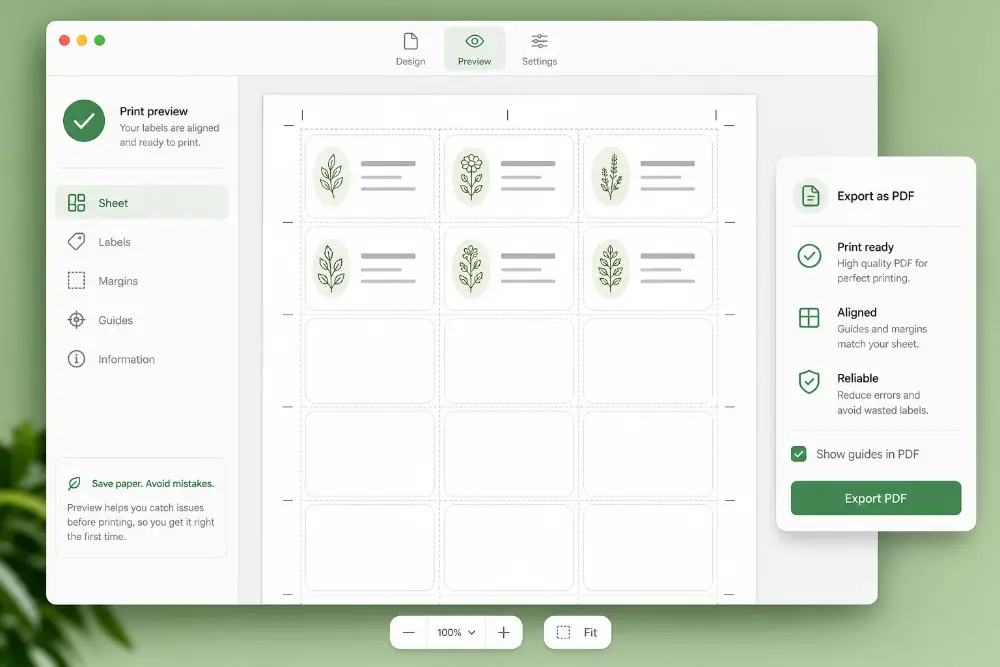
Set the paper, margins, gaps, and tag size once, preview the finished batch, and export only when the labels look ready for the printer.
Define paper size, margins, horizontal and vertical gaps, tag width, and tag height so the page matches your label stock.
Test the Mac app with your own products, prices, SKUs, assets, files, or classroom lists first. Upgrade when saved designs, custom paper setup, and clean PDF export are worth keeping.
Includes
Everything in Mac App, plus
Use the Mac app when price tags, barcode labels, QR labels, file labels, or asset tags are part of your weekly routine and you want saved designs, local files, custom paper setup, and predictable export costs.
| Comparison criteria | Mac App One-time desktop license | Web Version Web account plan |
|---|---|---|
Price model | $99 one-time for 1 Apple Silicon Mac, or $199 one-time for up to 5 Apple Silicon Macs | Pay as you go or use a monthly/yearly plan |
Export cost after purchase | After activation, export clean PDFs locally without paying for each export. | Clean exports use your web plan or account balance. |
Best for | Repeat price tags, SKU labels, QR labels, school asset tags, file folders, warehouse bin labels, thermal labels, and fixed workstations | Quick browser jobs, occasional exports, and label batches you prefer to finish online |
Paper and tag setup | Save A4, US Letter, thermal roll, Avery-style sheet, and custom tag-size setups for repeat jobs | Good for quick layouts, but less convenient for a dedicated printing station |
Local-first workflow | Spreadsheets, designs, and exported files stay on your Mac | Runs in the browser and uses your web account |
Output | Clean PDFs ready for Preview, Adobe Acrobat, or your normal macOS print dialog | Clean PDFs from the browser for occasional work |
Activation | Use checkout email and license key in the Mac app | Sign in and use credits or subscription access |
For repeat label jobs, the Mac app usually pays for itself by keeping your design, data mapping, paper setup, and PDF export flow ready on the same workstation.
Each part of the Mac app is built for repeat label work: design the label once, connect your data, choose the paper, preview the batch, and keep the whole setup ready for the next run.
Build the label the way it needs to look, not the way a fixed template allows. Drag text, prices, SKUs, addresses, logos, images, shapes, barcodes, and QR codes into the exact position for price tags, address labels, asset tags, file labels, shelf labels, and product stickers.
Turn spreadsheet columns into finished label text without copy and paste. Combine fields in one block, such as {{Product Name}}, {{Price}}, SKU: {{SKU}}, Size: {{Size}}, Bin: {{Location}}, or {{Name}} / {{Address}} for mailing labels. When the next row loads, the label updates automatically.
Create practical code labels from the data you already have: SKU labels, product IDs, warehouse bin labels, classroom assets, equipment tags, file numbers, product links, and internal tracking codes. Use the same design again when the next inventory or asset list arrives.
Use the stock you actually print on: A4, US Letter, thermal rolls, Avery-style sheets, small product stickers, address label sheets, shelf labels, file folder labels, and custom tag sheets. Enter the paper, margins, gaps, tag width, and tag height, then let the app calculate the rows and columns for the page.
Preview real rows before you waste label stock. Catch long names, crowded prices, missing addresses, bad QR links, clipped barcodes, and spacing problems while there is still time to adjust the design or paper setup.
Keep product lists, price files, address lists, asset registers, classroom lists, warehouse exports, and office inventories on your Mac. Save the design, reopen it for the next batch, export a clean PDF after activation, and print through your normal macOS printer settings.
A clear release history helps teams know what changed before they install the latest DMG. The current download is Label Maker for Mac v0.1.3 for Apple Silicon Macs.
v0.1.3
Current release
v0.1.2
Previous release
v0.1.1
Licensing update
v0.1.0
First preview
Next
Planned
Practical answers for shops, schools, warehouses, offices, and makers deciding whether the desktop app fits their label routine.
If you couldn't find the answer you're looking for, please feel free to ask us!
Install the Apple Silicon build, try your real products, prices, SKUs, assets, files, or classroom lists, preview the paper layout, and upgrade when the Mac workflow starts saving you time.
Use these focused web tools when you want a quick browser workflow before moving repeat jobs into the Mac app.
Make mailing labels and envelopes from contact lists.
Start from common Avery-style sheet layouts for address, product, and office labels.
Generate QR, SKU, inventory, asset, and barcode label PDFs from spreadsheet rows.
Create equipment, school asset, warehouse bin, and inventory tracking labels.