
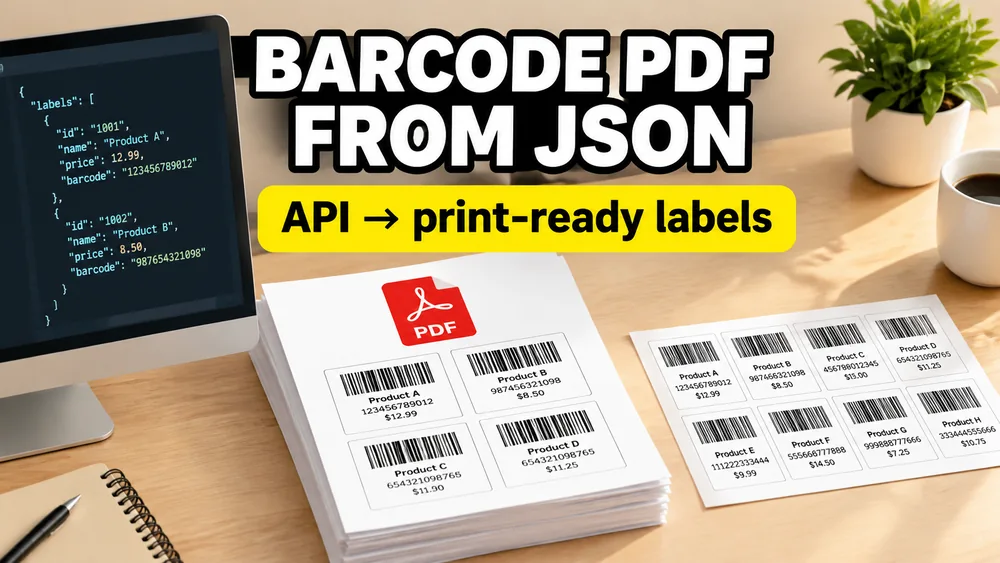
A barcode image API and a barcode label PDF API solve different problems.
A barcode image API usually returns one PNG, SVG, or JPEG. That is useful when your application only needs the barcode graphic. It still leaves your team responsible for product text, prices, label dimensions, sheet margins, repeated quantities, page breaks, and printer-ready PDF output.
A label PDF API handles the complete print layout. You send JSON records to a reusable template and receive a PDF already arranged for label sheets or one-label-per-page thermal printing.
SheetsToLabels is designed for the second workflow.
What a print-ready label API adds
A complete label normally contains more than a barcode:
- product name, SKU, price, location, or serial number
- a Code 128, UPC, EAN, QR, or other machine-readable element
- brand colors, lines, shapes, or a logo
- an exact physical label size
- a sheet or thermal printer layout
- a quantity for each source record
Generating only the barcode image does not decide where any of those elements should appear on paper.
With a reusable label template, the single-label design is stored once. Each API request selects how that design should be printed: one item per page, a supported sheet preset, or a complete manual grid.
Try a label-sheet request without an API key
The public Playground below sends three product records. The copies values expand them into six barcode labels arranged on one Avery 5160-compatible US Letter sheet. Switch to QR Card when you want to test a single personalized item instead.
Fixed demo Print Layout
- Layout type
- Preset
- Preset ID
- avery-5160-compatible
- Paper
- US Letter (215.9 x 279.4 mm)
- Label size
- 66.675 x 25.4 mm
- Sheet layout
- 10 rows x 3 columns
- Gaps
- X 3.969 / Y 0 mm
- Top / bottom
- 12.7 mm margins
- Left / right
- 3.969 / 3.968 mm
Product records
3 records expand to 6 labels on one US Letter sheet.
6 labels arranged on an Avery 5160-compatible sheet.
Edit the records, then generate the server-side PDF.
curl -X POST https://sheetstolabels.com/api/v1/demo/generate-pdf \
  -H "Content-Type: application/json" \
  -d '{"templateId":"api-demo-product-label-sheet","layout":{"type":"preset","presetId":"avery-5160-compatible"},"records":[{"variables":{"name":"Wireless Mouse","sku":"SKU-1001","price":"$24.00"},"copies":2},{"variables":{"name":"USB-C Cable","sku":"SKU-1002","price":"$12.50"},"copies":1},{"variables":{"name":"Laptop Stand","sku":"SKU-1003","price":"$39.00"},"copies":3}]}' \
  --output api-demo.pdf
The Playground returns a real server-generated PDF with a visible demo watermark. It uses a fixed public template and does not require an account or API key.
The JSON request model
Production requests use one endpoint:
POST https://sheetstolabels.com/api/v1/generate-pdfThe request contains a cloud-synced custom Template ID and a records array:
{
  "templateId": "custom-1234567890",
  "layout": {
    "type": "preset",
    "presetId": "avery-5160-compatible"
  },
  "records": [
    {
      "variables": {
        "name": "Wireless Mouse",
        "sku": "SKU-1001",
        "price": "$24.00"
      },
      "copies": 2
    },
    {
      "variables": {
        "name": "USB-C Cable",
        "sku": "SKU-1002",
        "price": "$12.50"
      }
    }
  ]
}
This request creates two adjacent copies of the first label, followed by one copy of the second. You do not need to duplicate the first product in your application data.
Single-label generation uses the same structure with one element in records.
Separate the label design from the Print Layout
The saved template defines one label or card:
- dynamic text, barcode, QR, shape, and image elements
- element positions and styling
- the physical width and height of one item
- the background and border
The request's layout object controls the output paper and arrangement. Use single for one item per PDF page, preset for a supported Avery or APLI sheet, or manual to provide the paper, rows, columns, margins, and gaps. The layout affects only that request and does not rewrite the template.
Avery-compatible sheets and thermal labels
For a sheet such as Avery 5160, send layout.type: "preset" and presetId: "avery-5160-compatible". The server validates that the template dimensions match the preset, then places records into its 30-up US Letter grid in request order.
For a thermal printer, design the template at the exact roll dimensions and send layout.type: "single". The API then returns a PDF where every page is one label. Print through the normal operating-system driver for Zebra, Rollo, Dymo, Brother, or another PDF-capable printer.
SheetsToLabels is not affiliated with Avery Products Corporation. "Avery-compatible" describes physical layout compatibility with the corresponding label stock.
Personalized QR cards use the same API
The same request model works when the output is a card rather than an adhesive label.
For example, a membership or ambassador system can submit a unique referral code and URL:
{
  "templateId": "custom-1234567890",
  "layout": { "type": "single" },
  "records": [
    {
      "variables": {
        "code": "ag193",
        "qrUrl": "https://example.com/ag193",
        "name": "Alex Morgan"
      }
    }
  ]
}
The response is one personalized PDF containing both the printed referral code and the matching QR code.
Successful PDFs and JSON errors
A successful request returns:
HTTP/1.1 200 OK
Content-Type: application/pdf
The response body is the PDF binary. Save or forward it only after checking the HTTP status and Content-Type.
Errors return application/problem+json with a stable error code, a readable detail, and a request ID. That means an invalid API key, inaccessible template, expired subscription, insufficient credit balance, or rendering failure does not get saved as a broken .pdf file.
See the API error reference for the complete status and code table.
Batch limits and page-based credits
One production request can contain up to 250 source records. After copies are applied, it can produce up to 250 output items and 25 PDF pages. Larger jobs should be split into several requests.
Credits are charged per final PDF page, not per source record or individual label. For example, several records that fit on one 30-up sheet consume one Credit because the result is one PDF page.
The endpoint is synchronous and returns the PDF immediately. It does not currently create an asynchronous job or hosted download URL, so your application should read each successful response when it arrives.
Privacy and cloud processing
The interactive SheetsToLabels editor is local-first, but the Business API is intentionally a cloud service.
When you save an API template, its single-label design and dimensions are synced to your account so the server can render it. The layout and values deliberately included in an API request are transmitted to the server to generate and return that PDF. Browser spreadsheet rows and local PDF history are not uploaded as part of template synchronization.
Read the API template privacy explanation before using production customer data.
When this approach is a good fit
Use a label PDF API when:
- a CRM, database, order system, or membership platform triggers generation
- the label design should be editable without redeploying application code
- several records must be arranged on a printable sheet
- different records need different copy quantities
- the output needs both human-readable text and barcodes or QR codes
- your application needs a finished PDF rather than an isolated image
If an employee is manually importing an occasional spreadsheet, the browser-based Bulk Barcode Generator may be simpler. Use the API for recurring server-side workflows.
Start with the public demo
Open the Label Generation API overview to compare use cases, or use the API Playground to generate a label sheet without a key.
When you are ready to use your own template, follow the API Quick Start. Signed-in accounts can start one 7-day trial with 10 successful single-page requests before subscribing to Business.
Frequently asked questions
Does the API print directly to a label printer?
No. It returns a print-ready PDF. Your application, operating system, print service, or fulfillment workflow decides how that PDF reaches the printer.
Can I generate only one label or card?
Yes. Send one object in records. Single and batch generation intentionally use the same request schema.
Can one request use several templates?
No. One request uses one Template ID and returns one combined PDF. Send separate requests when different records require different designs or paper layouts.
Does a failed request consume Credits?
Validation and rendering failures do not consume Credits. Business requests are charged only after successful PDF generation.
Do one-time Credit Packs unlock API access?
No. Production API access requires an active Business Monthly or Business Yearly subscription. Credit Packs add usage Credits while that Business access remains active.