
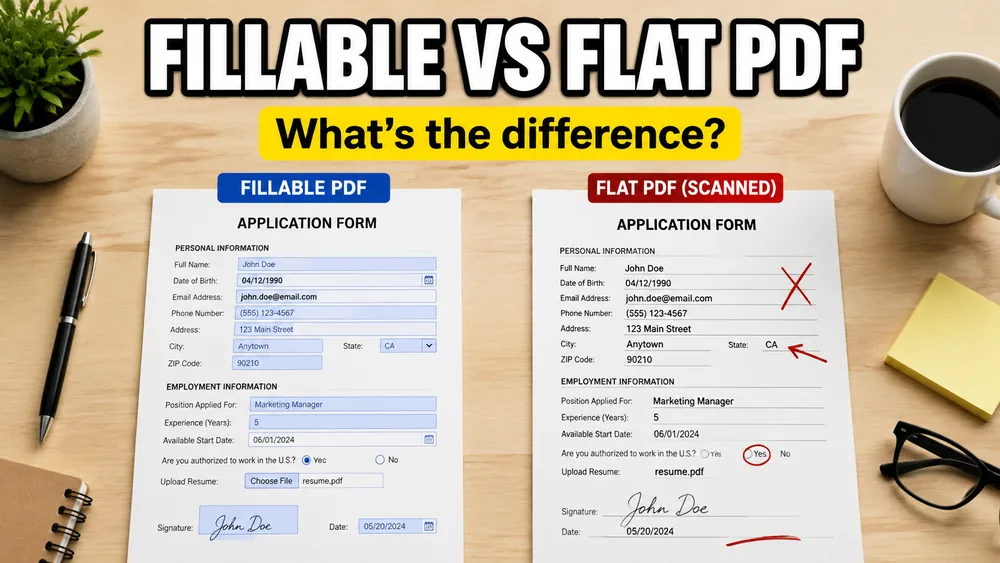
If you are trying to automate PDFs from Excel, CSV, or Google Sheets, one distinction matters more than most people expect:
Is the PDF fillable or non-fillable?
That difference determines whether you can detect built-in fields automatically or whether you need to map data onto the template visually.
Either type works in the tool: open Fill PDF from Excel for fillable forms and non-fillable overlays. For the full workflow walkthrough, see How to Fill a PDF from Excel.
Open the PDF Mail Merge Tool
Batch fill PDF forms from Excel—one PDF per row. Map columns once, preview free, export separate PDFs or a ZIP. No Acrobat or VBA.
What is a fillable PDF?
A fillable PDF contains actual interactive form fields inside the file.
These fields usually have:
- names
- editable inputs
- a form structure
That is why fillable PDFs are easier to inspect and connect to spreadsheet columns.
What is a non-fillable PDF?
A non-fillable PDF has no real form fields. It is just a static document layout.
It may still look like a form, but technically there is nothing to "fill" automatically unless your tool supports visual placement.
This is common with PDFs exported from:
- Word
- Canva
- Illustrator
- design systems
- internal reporting tools
- Scanned paper documents (which are processed as image-only files)
Why this matters for PDF mail merge
If the PDF is fillable:
- detect the fields
- map spreadsheet columns to field names
- generate output
If the PDF is non-fillable:
- place values visually on the page
- preview the result
- generate output
Both can be automated, but the workflow is different.
Which one is more common in real business workflows?
Non-fillable PDFs are extremely common because teams often already have approved templates. They do not want to recreate those documents as interactive PDFs just to automate them.
That is why support for non-fillable PDFs is often the feature that makes PDF mail merge actually useful.
Which one should you look for in a tool?
The best workflow supports both:
- fillable PDF forms
- non-fillable PDF templates
That way you are not limited by how the PDF was created.
A practical workflow
Fill PDF from Excel, Google Sheets, or CSV supports both kinds of PDFs.
If the document is fillable, you can map columns to form fields.
If it is non-fillable, you can use a visual mapper to place text, barcodes, QR codes, and images on the template.
That is what makes it practical for certificates, contracts, invoices, labels, and other production documents.
If you want to see those scenarios in action, read How to Fill PDF Invoices from Excel, How to Fill PDF Contracts from Google Sheets, and How to Batch Fill PDF Forms Without Acrobat.
Frequently asked questions
Is a non-fillable PDF useless for automation?
No. It just requires a different workflow, usually a visual mapper or PDF overlay tool.
Is a scanned document considered a non-fillable PDF?
Yes. When you scan a physical piece of paper to a PDF, it is saved as flat image layers. It contains no interactive text field components, meaning standard PDF form-fillers cannot detect any fields. You must use a visual overlay mapper (like drag-and-drop mapping) to place text on it.
What is AcroForm?
AcroForm is the common interactive form system used inside many fillable PDFs.
Can I generate one PDF per row with either type?
Yes. Fillable and non-fillable PDFs can both support one-PDF-per-row generation if the tool supports the right mapping model.
Fill PDFs from Excel, Google Sheets, or CSV
If you need to map spreadsheet data onto fillable or non-fillable PDF templates, try filling PDFs from Excel, Google Sheets, or CSV with PDF Mail Merge. It supports one PDF per row, merged review files, and ZIP exports.